
How does the Lootbound inventory work?
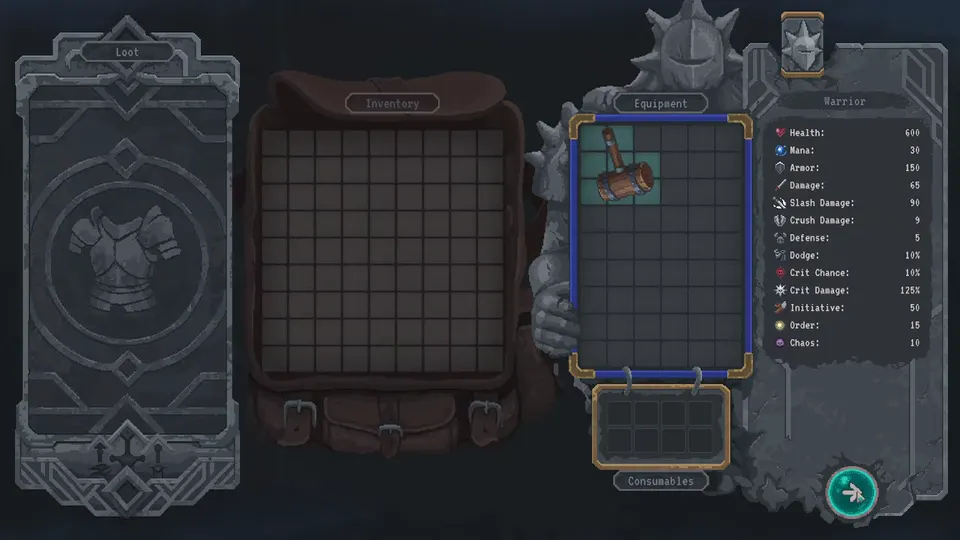
There are no fixed slots. Every item is a geometric shape you rotate onto a square grid. It only works while it stays equipped on that hero or companion.

Lootbound inventory guide: rotate geometric shapes onto hero and companion grids. Unequipped loot does nothing; auras buff adjacent cells. Verified August 2026.
Watch the backpack tutorial: rotate a shape, seat one loot-card item, then pack auras on adjacent cells.
~12 min read
The Lootbound inventory is the build screen, not a junk drawer. Lootbound (ArtDock / Dreland Enterprises) has no fixed equipment slots — every weapon, armor piece, and accessory is a geometric block you rotate onto a square grid. This page is the packing rulebook: what counts as equipped, why a backpack full of loose shapes still loses fights, and how hero and companion grids stay separate. Verified August 15, 2026 · Steam.
| Fact | Detail |
|---|---|
| Platform | Steam · Win / macOS / Linux · Xbox Series |
| Genre | Pixel top-down tactical roguelite |
| Mode | Single-player |
| Price | $14.99 · launch ~35% off to $9.74 until ~Aug 28 |
| Slot rule | No helmet / weapon / armor slots — any piece that fits can sit on the grid |
| Item shape | Rotate geometric blocks (bars, L-shapes, singles, large irregulars) |
| Equipped only | A piece works only while it stays placed on that character |
| Party grids | Hero and each companion keep a separate backpack |
| Auras | Some items buff weapons or armor in adjacent cells |
| Consumables | 1.0: hero-only — confirm companions still cannot seat them |
| Grid size | TBA — one pre-release review cited a compact 9×6 board; confirm in 1.0 |
Steam’s own copy is the rule: items do not have fixed slots. You rotate them and place them as long as a cell is free. That is the whole Lootbound inventory — a Tetris-style backpack where the footprint is the item.
| What you see | What it actually is |
|---|---|
| Backpack / grid | The character sheet. Empty cells are unused power, not storage |
| Item shape | The real cost. A tall weapon and a square helm are different taxes |
| Rotate | The first tool. Sideways often seats a piece that “does not fit” |
| Discard | How you buy cells back after a loot card |
| Aura glow | A neighbor bonus, not a self-buff — see auras |
There is no reserved helmet row and no weapon hand. If ten helms fit, the game will let you wear ten helms. If a class-locked reward will not accept the current hero, it still occupies the same kind of cells on the character who can use it. Treat every drop as a polyomino first and a stat stick second.
After a win the loot card offers a short list. You move only one item from that card onto a grid. The rest walk away. That is why shape-reading happens before the drag, not after the bag is already jammed.
Once you know the board is the build, the next failure mode is obvious: the piece never sat down.
Companions follow the same equipment rule as the hero: items only work when equipped. A shape in the reward pile, a shape you previewed and cancelled, or a shape you kicked off the grid to make room is not in the fight.
| Symptom | Usual cause | Fix |
|---|---|---|
| New weapon, same damage | It never fit, or you dropped it to keep an old cluster | Rotate, then reseat; if it still fails, the old cluster was the real upgrade |
| Stats look high, fight feels empty | You packed the hero and forgot the companion who actually swings | Open that companion’s grid — see party section below |
| Aura text, no bonus | No legal neighbor, or the aura wants a type you did not place beside it | Slide one cell; read the target line on auras |
| Potion missing in combat | It sat on a companion grid | Consumables are hero-only — move them back |
Seating a piece and then rotating a larger neighbor on top of it unequips the first one. The Lootbound inventory does not keep a hidden loadout behind the puzzle. What you see on that character’s grid is the only kit they take into the next node.
Hovering a loot-card shape over empty cells is a test. If you leave the card without placing, you took nothing. If you place and the outline stays red, you took nothing. The first-run loop on the beginner guide is the same habit: fight, then pack, then leave.
If the outline is the problem, rotation is the next tool — not a bigger rarity.
The in-game prompt is blunt: rotate items to use inventory space more efficiently, and discard what you do not want. Do that as a short ritual after every card, not as a panic clean-up before a biome gate.

Public writeups group footprints the same way the board feels: single-cell accessories, vertical or horizontal bars, compact squares, L-shapes, and large irregulars. Exact names and cell counts per item stay TBA on the items index — do not memorize a fake catalog. Memorize the tax: a large irregular that blocks three neighbors is more expensive than its rarity banner.
A clean rectangle of gear is easier to reopen than a jagged skyline. Keep one flexible fringe — small or situational pieces — so the next awkward drop does not force a full rebuild. The mid-page table below is the keep / drop / rotate call you make once the outline is green.
Use this after the outline turns green. Stats are the last column, not the first. A legendary that deletes two aura contacts is a downgrade even when the tooltip is louder.
| Situation | Keep | Drop | Rotate / slide |
|---|---|---|---|
| Fits without touching the core cluster | Yes, on the fringe | If it is a dead type for this biome | Only if a facing frees a center cell |
| Fits only by breaking an aura pair | No — unless the new piece replaces both jobs | Default | Try every facing first; one slide can save the pair |
| Better raw stats, worse footprint | Only if you are empty on that stat | If the old shape feeds two neighbors | Park it on a companion who has the hole |
| Class-locked to someone else | On that companion’s grid | On the hero — it will never fire | Do not waste hero cells testing it |
| Awkward bar, empty edge row | Yes, as a border piece | If the bar steals a center plus | Lay it along the rim, not through the middle |
| Small accessory, jammed bag | If it is Initiative / Order / Chaos you still lack | If it is a spare you are “saving” | Single cells are hinges — keep two empty if you can |
| Duplicate of a seated piece | Only when the copy enables a second aura | When it is pure overlap | Stack them only if the aura wants that type twice |
What shape is it? Does it feed an aura I already seated? What do I throw out to make room? If the answer to the last one is “the cluster that is carrying the run,” leave the drop on the floor. Inventory space is the scarce currency — gold-bordered loot is not.
The Lootbound inventory is not one shared party suitcase. If the hero is dense and a companion is hollow, the keep decision can be “keep, but not here.” That is the next section.
Matched by build plan, shared topics, and guide progression — not random related links.
Steam: collect a separate set of equipment for the hero and each companion. Guides that talk about one shared backpack are describing the party as a whole, not the UI. Each recruit opens a second (then a third) puzzle with the same rotate-and-seat rules.
| Grid | Who packs it | What it is for |
|---|---|---|
| Hero | You, every fight | The only kit you click in combat — plus consumables |
| Companion A | You, between nodes | Automatic kit. Same equip rule, no consumables |
| Companion B | You, between nodes | Same as A. Do not clone the hero’s shapes onto it |
A shape that seats cleanly beside a Warrior slash cluster may waste a Paladin’s armor neighborhood or a Bard’s instrument row (some writeups say Jester — this wiki uses Bard and notes the alias). Pack for the role on classes, not for “whoever has a hole.”
Combat stays hero-only. Companions resolve from initiative with whatever you left on their grid. A beautiful hero backpack and an empty Paladin bag is a half-build — the combat page covers turn order; this page is why that Paladin never grew armor.
Once both bags have a spine, adjacency is the reason you slide instead of hoard.
Some items strengthen weapons or armor in adjacent cells. Steam’s warning is the packing rule: moving a piece one cell can rewrite the whole kit. The Lootbound inventory is where that rewrite happens — the aura page is the catalog of why.
| Pack habit | Why it matters | Do this |
|---|---|---|
| Read the target line first | Many auras want a weapon type, an armor type, or an edge | If the neighbor is the wrong class of piece, the glow is decoration |
| Center before corner | A middle cell can touch more neighbors than a corner | Seat the aura, then wrap legal pieces around it |
| Do not scatter twins | Two half-clusters lose to one tight district | Damage pieces together, armor together, utility on the fringe |
| Rarity is not adjacency | A legendary irregular can delete three contacts | Keep the common piece that sits in two auras |
Early guides call this zoning: a damage district, a defense district, and a small utility corner. You do not need named items to do it. You need one offensive aura touching the weapons you will actually swing, and enough empty cells that the next items drop can join the same neighborhood.
If a new shape is “almost” right, rotate it, then slide the old neighbor one cell. Full wipes are for biome gates and dead kits, not for every loot card. When the glow finally matches the tooltip, stop packing and go read how those neighbors actually scale on auras.
1.0 tutorial / play: companions can wear gear; drinks stay on the hero. Potions, bombs, and other one-use tools live on the hero grid. Treat that as the default until a patch says otherwise.
| Piece | Which grid | Packing note |
|---|---|---|
| Weapon / armor / accessory | Hero or the matching companion | Rotate to fit; class locks still apply |
| Consumable | 1.0: hero grid | Do not park drinks on a recruit and hope the AI drinks them |
| Aura item | The character whose neighbors can use it | A hero-only potion next to an aura is a wasted neighbor |
Consumables are temporary. Park them on the fringe or in a single-cell gap so using one does not rip a hole through the damage cluster. Community notes about a two-consumable carry cap stay TBA until we log the 1.0 bag — pack as if every potion costs a cell you might need for a real shape.
Because you only issue hero orders, a potion on the hero is the only potion you can spend. A “full” companion grid stuffed with drinks is a misread of the Lootbound inventory, not extra storage. If the hero bag is the bottleneck, drop a fringe accessory, not the last heal.
The last pass is a short list of packing errors that look like bad loot.
Scan this before the next loot card. Each row is a grid error, not a combat error.
| Mistake | Fix |
|---|---|
| Treating the bag as shared party storage | Open the companion grid. Steam wants a separate set per character |
| Seating rarity before footprint | Rotate first; drop the legendary if it breaks two auras |
| Leaving the default facing | Cycle every rotation — bars belong on edges |
| Parking an aura in a corner | Move it in until it has more than one legal neighbor |
| Cloning the hero kit onto every recruit | Pack the role — classes |
| Consumables on a companion | Move them to the hero — 1.0 companions could not seat drinks |
| Forcing a second item off one loot card | You only get one seat per card — discard the rest |
| Saving “just in case” junk | Empty cells are future auras. Discard the spare |
| Rebuilding after every drop | Slide one cell. Full wipes are for dead kits |
| Ignoring damage type on the new shape | A crush bar in a slash district is a tourist — damage types |
Before you leave the inventory screen, look at each grid and ask whether every seated piece is still touching the neighbor it was packed for. If a glow died, slide; if a shape is lonely, drop it. Then take the sequel page — adjacency is the rest of the build.
There are no fixed slots. Every item is a geometric shape you rotate onto a square grid. It only works while it stays equipped on that hero or companion.
Yes. The tutorial tells you to rotate to use space efficiently. A piece that fails upright often seats as a bar on the edge.
It never fit, you discarded it, or you seated it and then overwrote the cells. Unequipped loot is not in the fight.
No. The hero and each companion have separate grids. You pack a different set for each character.
No. Companions can wear gear; consumables typically stay on the hero grid only.
One. Move a single item onto a grid, then discard or walk away from the rest.
Official cell count is TBA. A pre-release review cited 9×6; confirm the live board in 1.0 before you plan around a number.
Yes. Auras buff adjacent weapons or armor. One-cell slides can turn a kit on or off — full rules on auras.
No. If the footprint breaks a working cluster, the common piece that sits in two auras is the upgrade.
The beginner guide — fight, pack, then leave the biome with a Boss Part.
August 15, 2026
Matched by build plan, shared topics, and guide progression — not random related links.